n8n · Billing & finance
Billing Operations
Checks whether payment totals match the expected amounts after fees and refunds, then flags differences for review. It also checks whether an invoice is still unpaid before preparing a reminder draft. This helps the team investigate billing differences and avoid chasing customers who have already paid.
Tools & integrations
- n8n
- Stripe
- Google Sheets
- Gmail
Problem
The amount paid out by a payment provider may differ from the invoice total because of fees or refunds. The billing team needs to explain that difference and avoid sending payment reminders to customers who have already paid.
Solution
The sample-data simulations compare the expected payout, including fees and refunds, with the supplied payment records and flag differences for review. They also check whether an invoice is still unpaid before preparing a reminder draft. The screenshots show the original n8n templates; the tests use sample records rather than live Stripe data and do not send emails.
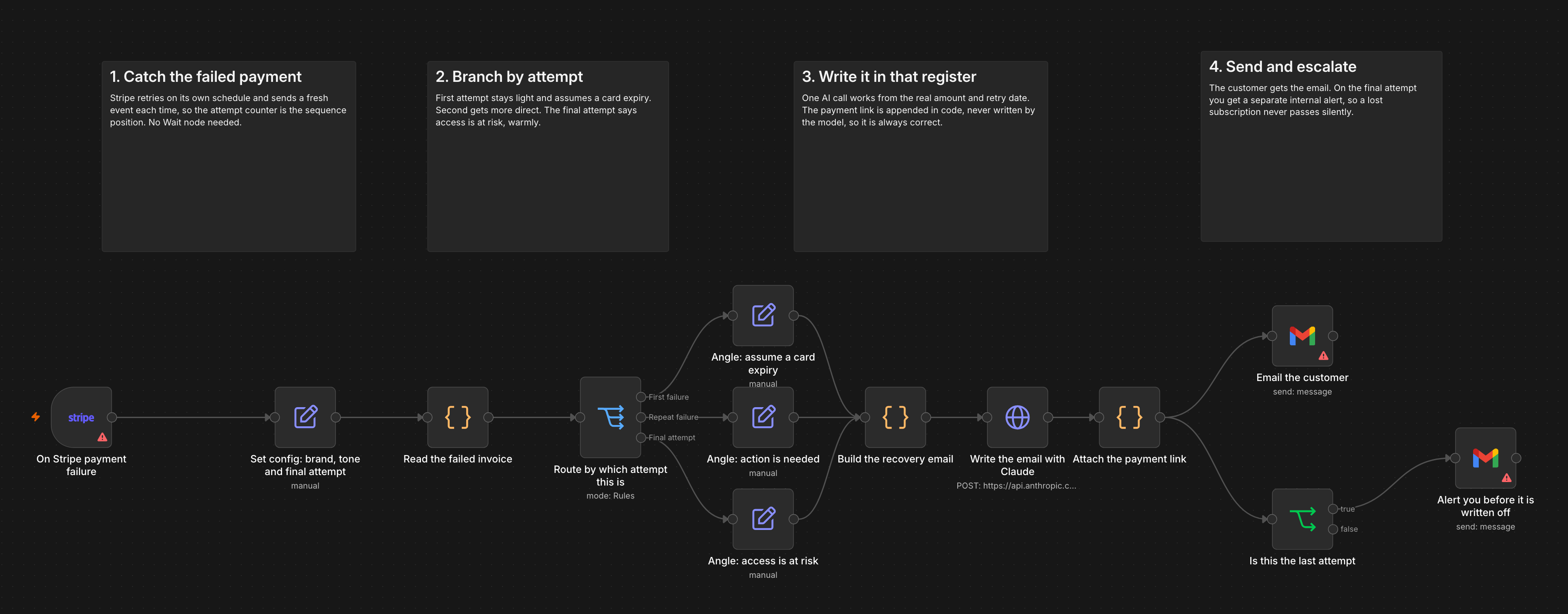
Payment recovery · Complete workflow overview
Simulation implementation
- Replaced the empty reconciliation outline with integer ledger arithmetic and explicit exception reasons.
- Added current-invoice-state checks before producing a local email draft.
How the tested simulation works
- Validate ledger inputs
- Reconcile payout totals
- Draft unpaid invoice follow-up
Test evidence
Recorded 2026-10-02 · Simulation scenario results
- Fees reconcile exactly — passed
- Paid invoice suppresses follow-up — passed
- Payout mismatch routes to review — passed
- Duplicate ledger rows require review — passed
- Mixed currencies cannot reconcile — passed
- Fractional minor units rejected — passed
- Refund is included as a negative ledger amount — passed
Sample output
{
  "status": "matched",
  "reason": "balanced",
  "difference": 0,
  "followUp": "draft-only",
  "draft": "Please review your outstanding invoice INV-1. Contact our team if you need help."
}