Make · Sales & accounting
Sales Order Billing & Reconciliation
Designed to turn customer orders into QuickBooks invoices. It checks customer details, products, quantities, and totals before creating an invoice and downloading its PDF. Orders with problems are set aside for review, helping the team catch mistakes before billing customers.
Tools & integrations
- Make
- QuickBooks
- Make Webhooks
- Make Data store
- Make Iterator
- Make Array aggregator
Problem
Turning a sales order into an invoice requires checking the customer, every product, and the final total. Missing records, incorrect amounts, or an order submitted twice can lead to an incorrect or duplicate invoice.
Solution
This Make workflow design checks the order against existing QuickBooks customer and product records, adds up the items, and compares the result with the order total. Orders with problems go to a review list. The design tracks orders to prevent repeat processing and saves the invoice reference before downloading its PDF. It has not yet been tested with QuickBooks or created a real invoice.
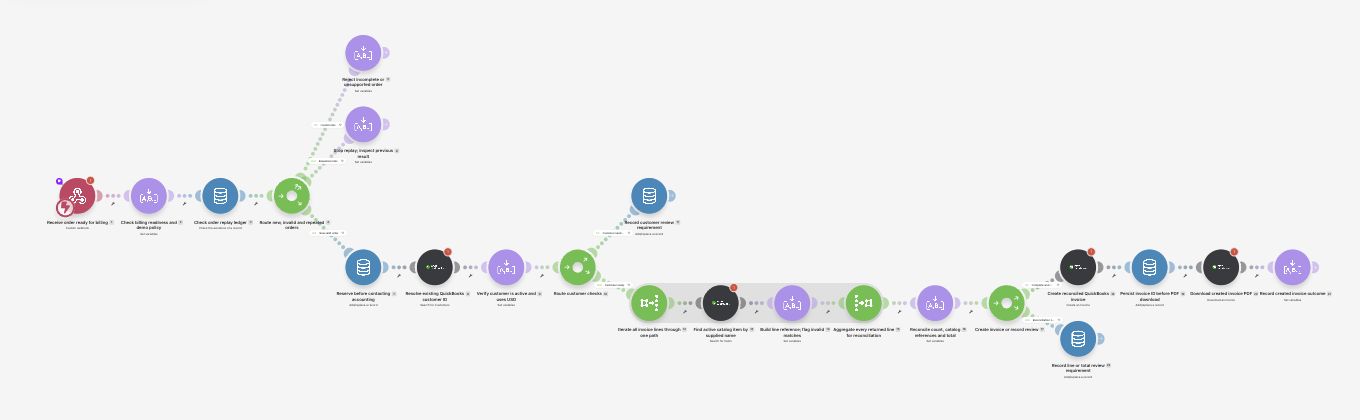
1 · Complete sales-order billing and reconciliation workflow — portfolio demo
Workflow implementation
- Redesigned the structure around three routers, one item-resolution path, and reconciliation before the accounting write.
- Replaced shared item-variable handoffs with explicit line references and an array aggregation.
- Kept customer creation outside the flow and placed invoice-ID persistence before PDF retrieval.
- Uses fictional demonstration inputs. Client names, credentials, connections, and private endpoints are excluded from the portfolio material.
Intended workflow
- Validate required order fields, billing readiness, USD currency, and zero-tax scope; check the replay ledger.
- Reserve the order key and resolve one active existing QuickBooks customer.
- Iterate all lines through one catalog lookup path and validate item references, quantities, and line amounts.
- Aggregate the returned lines and reconcile line count, references, and total cents.
- Route review cases to the ledger; otherwise create an invoice, persist its ID, and download the PDF.