Make · Finance & documents
Supplier Invoice Intake & Review
Designed to collect invoice PDFs from Google Drive, read their details, and organize them in Google Sheets. It flags missing information and checks whether the same file has already been recorded. This reduces manual copying and gives the team one place to track incoming invoices.
Tools & integrations
- Make
- Google Drive
- PDF.co
- Google Sheets
- Make Data store
Problem
When suppliers send PDF invoices, someone has to copy the details into a spreadsheet, check for missing information, and track what has been reviewed. The same file can be picked up again, leaving the team with duplicate entries and extra checking.
Solution
This Make workflow design is intended to collect new invoice PDFs from Google Drive, read their details with PDF.co, and add them to a Google Sheets review list. It checks whether a file has already been recorded and flags missing details for a person to review. The app connections still need setup; reading real PDFs and writing spreadsheet entries have not been tested.
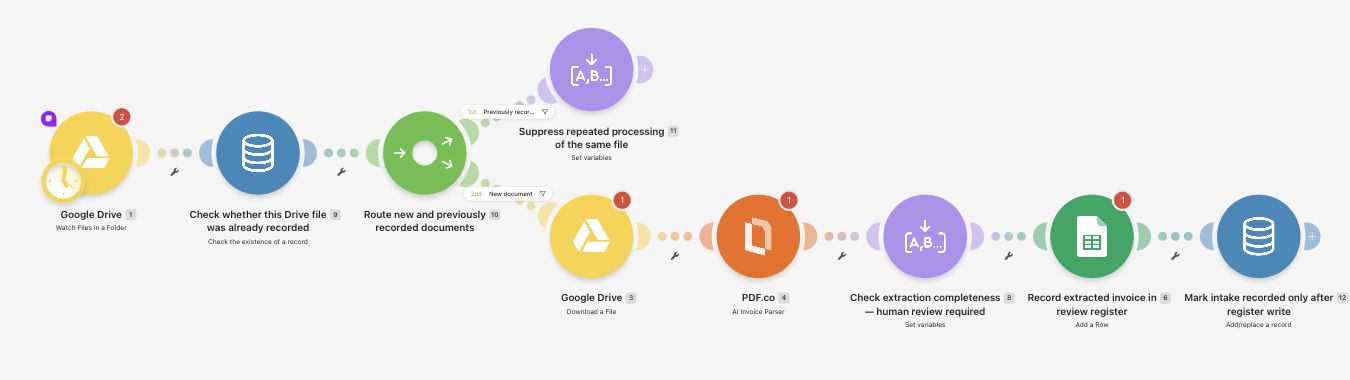
1 · Complete invoice-intake and review-register workflow — portfolio demo
Workflow implementation
- Expanded the template into a nine-module intake workflow with a replay check before PDF extraction.
- Mapped the supplier from the vendor fields and added extraction-completeness flags.
- Kept human review mandatory and moved the recorded-file marker after the Sheets write.
Intended workflow
- Watch the configured Drive folder and check whether the file ID has already been recorded.
- Skip recorded files; download new PDFs and extract invoice fields with PDF.co.
- Flag incomplete extraction and record fields in a human-review register.
- Mark the file recorded only after the register write succeeds.