n8n · Payments & operations
Payment-to-Onboarding
Designed to connect a client’s payment with their project setup. It checks that the payment matches the selected service and price, tracks completed setup steps, and prevents repeated payment notifications from starting the same project twice. If a step fails, the process can continue from where it stopped.
Tools & integrations
- n8n
- Stripe
- Google Drive
- ClickUp
- Gmail
- Slack
Problem
After a client pays, the team needs to set up their project and onboarding tasks. A repeated payment notification should not create a second project, and a failed task step should not force the team to start everything again.
Solution
The sample-data simulation checks that a test checkout is paid and matches the expected package, amount, and currency before starting a simulated project setup. It tracks completed steps so repeated notifications do not create another project and a retry can continue after a task failure. The screenshots show the original n8n template; no real folders, tasks, or welcome emails are created.
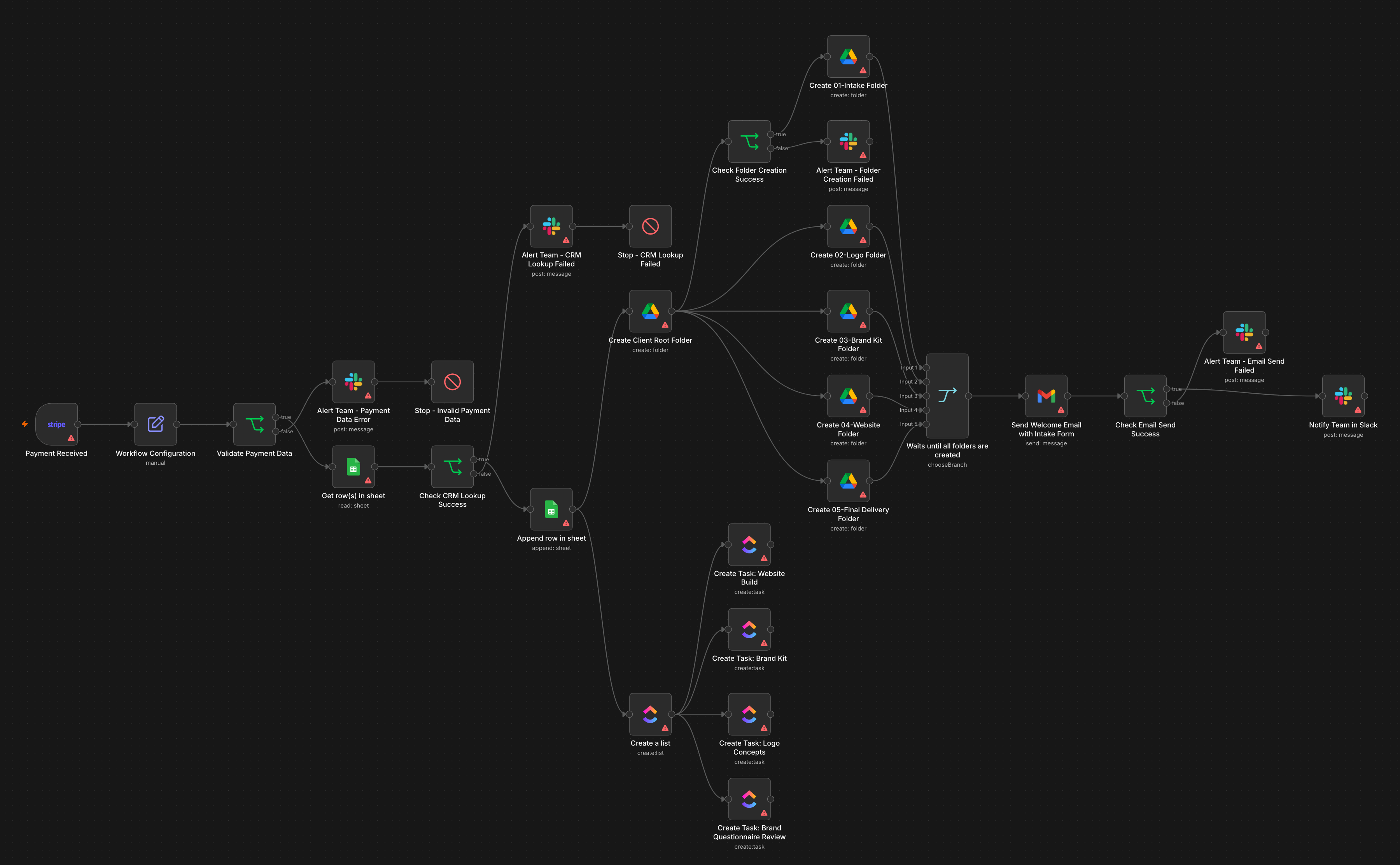
Complete workflow overview
Simulation implementation
- Added paid-state, catalog, amount, currency, and fixture-recipient checks.
- Added a session-keyed simulated ledger, duplicate suppression, and partial-failure retry scenarios.
How the tested simulation works
- Validate paid checkout
- Simulate fulfillment ledger
- Prepare onboarding summary
Test evidence
Recorded 2026-10-02 · Simulation scenario results
- Paid one-time checkout — passed
- Asynchronous paid checkout — passed
- Unpaid checkout — passed
- Open session — passed
- Live event — passed
- Missing explicit mode — passed
- Invoice event — passed
- Unknown package — passed
- Wrong amount — passed
- Wrong currency — passed
- Subscription checkout — passed
- Missing email — passed
- Non-fixture email — passed
- Missing name — passed
- Missing event ID — passed
- Wrong session object — passed
- Invalid session ID — passed
- Duplicate event does not create another project — passed
- Different events for same session share fulfillment — passed
- Retry resumes after simulated task failure — passed
- Partial failure remains pending without retry — passed
Sample output
{
  "projects": 1,
  "folders": 1,
  "tasks": 1,
  "duplicates": 0,
  "retries": 0,
  "status": "completed",
  "amountDisplay": "$500.00",
  "delivery": "simulation-only"
}