Web Development
Your Website Loaded. The Menu Is Still Interviewing Your Click.
The menu looks ready, accepts two clicks, then opens and closes without you. Follow the delay through startup, browser work, and server waits before ordering a new website.
On this pageJump to section
Introduction
Picture a menu button that looks completely ready. You click it. Nothing. You click again. It eventually opens, then closes, having carefully processed both requests and helped with neither.
You are trying to find the Contact page. The menu has arranged a small test of your commitment.
This illustrative delay can have several causes. A page appearing, a click receiving feedback, and a server operation finishing are different milestones. Finding which one is waiting is more useful than repeatedly negotiating with the menu.
Is the browser busy, or is it waiting for a reply?
JavaScript and rendering work compete for main-thread time. A long task may delay the event handler or the next paint. A control can also acknowledge a click promptly while a network request continues. Those waits can feel similar but need different investigation.web.dev: Rendering performance
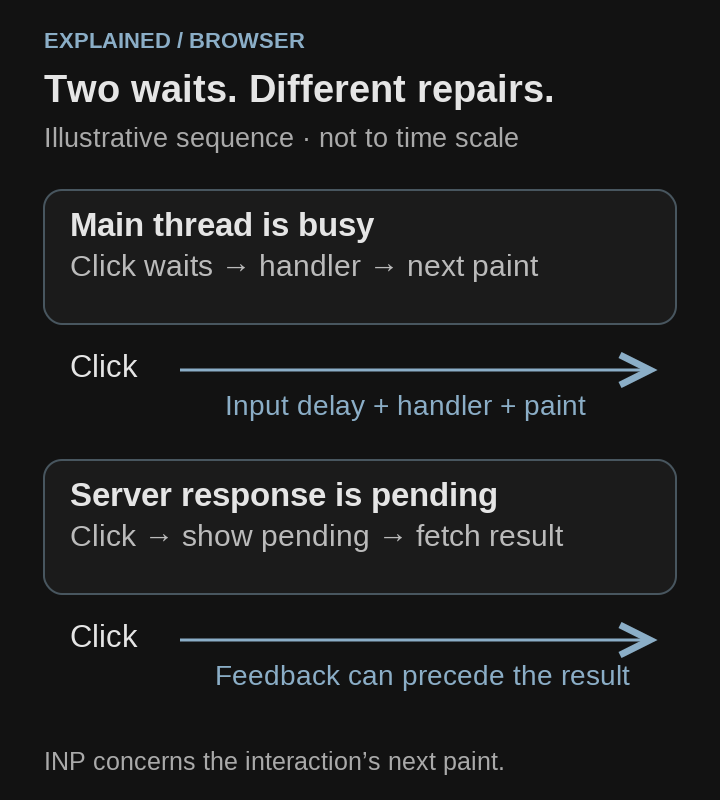
In the first sequence, work on the main thread delays the response. In the second, the interface can show a pending state before the server result arrives. A responsive pending state is useful feedback; it is not evidence that the operation succeeded.
Imagine the menu shares browser time with a search filter that sorts a large collection on every keystroke. That local calculation can keep other work waiting even with a fast connection. Buying a faster server will not stop a calculation already occupying the browser. You have given the wrong employee a better office.
INP watches the next paint, not the whole errand
Interaction to Next Paint, or INP, evaluates responsiveness across clicks, taps, and keyboard interactions during a visit. Its interaction latency includes input delay, event processing, and presentation delay through the next paint. It is not the duration of every later server operation.web.dev: Interaction to Next Paint
For our menu, the next visible response is central to the problem. A save button that shows “Saving…” immediately but waits for the server has a different completion delay. Measure those separately. A prompt “Saving…” is useful; letting it sit there forever is a status update with a long-term lease.
Follow the delay to the work causing it
Record the failing interaction. Inspect long tasks, repeated rendering, expensive synchronous work, and startup dependencies. If feedback is prompt but the result arrives late, trace the network request into the service.
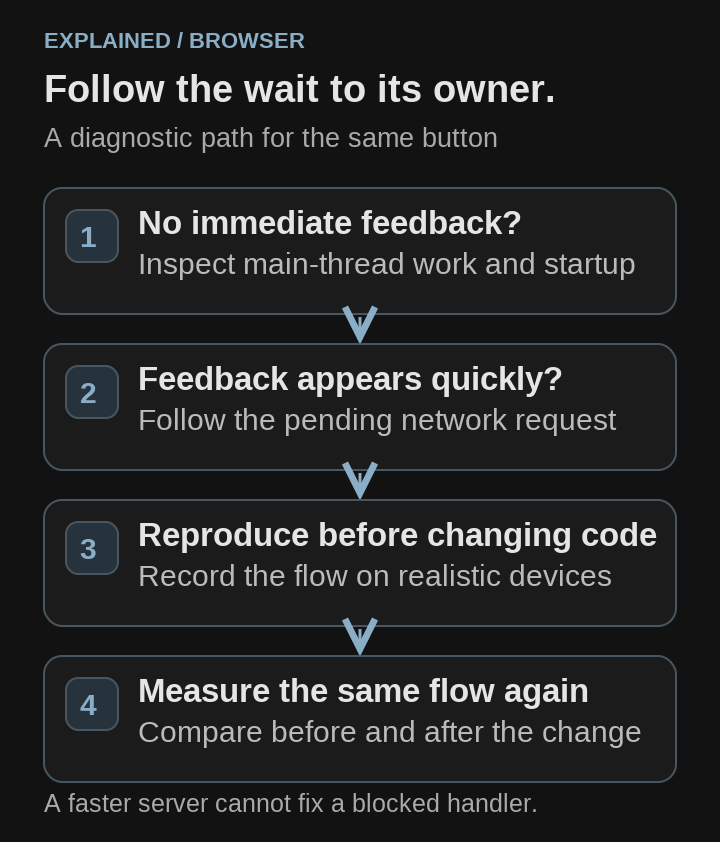
Start by checking whether feedback appears promptly, then investigate the browser or request path accordingly. Reproduce on realistic devices or with appropriate throttling. After changing the relevant work, measure the same interaction again.
The recording may point to less work per keystroke, deferring optional features, or splitting a long task. Change the work you can demonstrate, then reproduce the same click. Replacing the entire framework before finding the delay is a rather expensive way to ask a menu whether it is busy.
Give one click a truthful answer
Show pending feedback when work starts and tie success to the actual result. For actions that should not be repeated, handle repeated clicks and retries deliberately. Do not turn a spinner into a fictional success badge.
- Test the menu, search, filters, and form submission after initial load.
- Include realistic devices; one fast laptop is one sample.
- Compare both interaction feedback and operation completion where relevant.
Try the original click again on a realistic device. The menu should respond clearly and do what the user asked, without requiring a second application to the Department of Opening Menus. Contact should be a destination, not a persistence test.
Key takeaways
- A rendered control, responsive feedback, and completed server work are separate milestones.
- Distinguish main-thread delay from network wait.
- Use INP for interaction responsiveness and inspect completion time separately.
- Reproduce, change the demonstrated cause, and retest the same flow.