AI
AI Agents vs Chatbots: Sam Has a Meeting. Allegedly.
Sam asked for a meeting and received an enthusiastic “Booked!” The calendar remains suspiciously empty. Follow the request to see what chatbots, tools, and agents actually do.

On this pageJump to section
Introduction
In this hypothetical example, Sam asks an assistant to book a meeting. It replies, “Absolutely! Your meeting is booked.” Sam checks the calendar. Nothing. Checks the inbox. Nothing. Apparently the meeting is being held inside the sentence.
A second assistant checks availability, shows Sam a slot, creates the event after confirmation, and returns the booking result. It produces a less exciting paragraph and a considerably more useful Tuesday.
Both have a chat box. The useful question is what happens behind it: does the system explain the job, follow a defined process, or choose its next steps from what it discovers? The examples below illustrate designs, not the behavior of a specific product.
A chat box does not come with calendar keys
A chatbot is a way to interact through messages. Behind it may be generated text, a knowledge base, external tools, or a combination. A conversation on screen does not reveal how much the system can do.
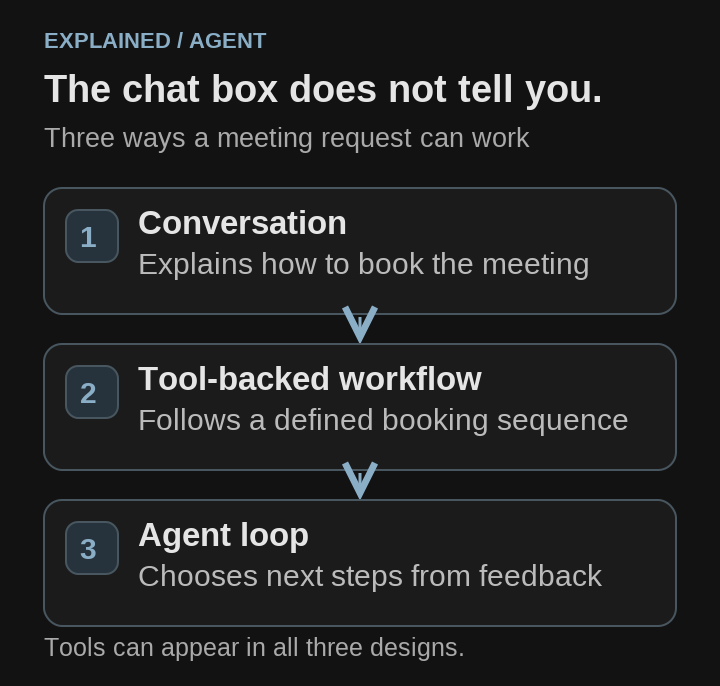
A conversation can explain booking, a tool-backed workflow can follow a known sequence, and an agent loop can choose steps using feedback. These are useful design distinctions, not mutually exclusive product categories: a chatbot can use tools, and a workflow can include a model.
Vendors use “agent” differently. Ask what the system can read, change, and verify. Sam’s first assistant could describe a calendar beautifully. That is also a skill possessed by a wall poster.
A predictable workflow can be enough
For this meeting, a defined sequence is useful: read availability, let the user review a slot, create the booking after confirmation, and check the result. The model can interpret the request without reinventing calendar etiquette.
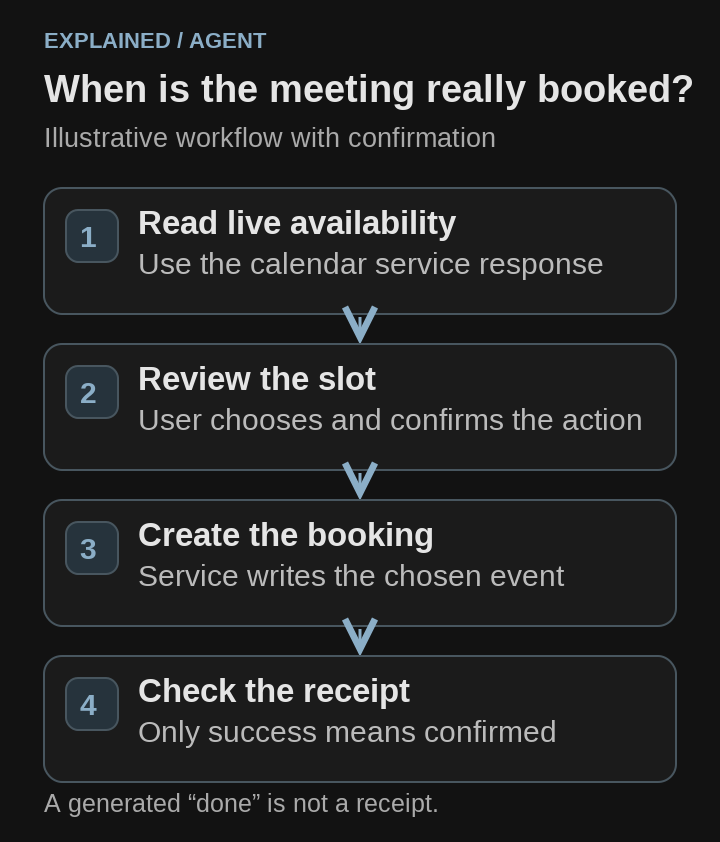
The user’s choice authorizes the action; the calendar response establishes whether it succeeded. If the write is uncertain, show that uncertainty and reconcile the result before retrying. “Pending” and “confirmed” describe different states.
An agent loop becomes useful when new information changes what to do next, as when research reveals another source worth inspecting. Sam’s straightforward booking may only need the defined sequence above. Tuesday at two should not require the assistant to discover its purpose in life.
Please do not improve Sam’s entire Tuesday
Checking Sam’s free slots, creating the approved event, and cancelling another meeting to make room are different actions. Sam asked for help booking, not a surprise calendar renovation. Define what the system may do, which changes need confirmation, and where time, spend, and retry limits stop it.
Suppose the calendar creates Sam’s event but its reply gets lost. Retrying blindly could send another invitation. Use a service-supported duplicate-prevention mechanism, often called idempotency, or a reliable check of the existing result. Sam wanted one meeting. Two copies of Tuesday at two do not make the assistant twice as helpful.
Judge the receipt, then the recovery
Try an ordinary request, an ambiguous request, and one outside the system’s permissions. Check the calendar afterward. Interrupt the process and inspect how it explains completed, pending, and failed steps.
- Which systems can it read and change?
- What proves the action completed?
- Can a repeated request create duplicate work?
- Where can you inspect failed actions and recover?
Choose the least complicated design that completes and verifies the job. For Sam, the finish line is a confirmed event and a clear explanation if something fails. “Booked!” can keep its exclamation mark once there is a meeting for it to celebrate.
Key takeaways
- A chat interface does not establish what is underneath it.
- The application executes tools; generated requests and prose do not prove success.
- Use a defined workflow when the sequence is already clear.
- Evaluate verified actions, duplicate prevention, stopping conditions, and recovery.